From laptop to Raft cluster: Four ways to run Enroute
tl;dr: Enroute is not only the fastest Git server out there, it can also be hosted in different setups with a simple config change: Get going with a local dev server on your laptop that starts from a single command. Host a single VPS with nothing but a local or network-attached disk. Extend your setup from a bucket in object storage with as many compute nodes as your traffic needs. Or run a multi-node Raft cluster for high-availability production setups.
Every team has a different idea of what "hosting Git" means. For one developer it's a server they can start from their terminal and build against or a simple VPS that just runs. For a platform that supports thousands of agents pushing at once, it means a highly available cluster that never stops taking pushes and auto-scales compute.
We built Enroute so that you can easily get started from a single command and adjust your setup through config as you need along the way. This applies to your hosting setup as well as the way you customize and program your setup via opt-in hooks. You decide on the setup you want to run and Enroute does the rest. Use it for anything from hobby projects to high-availability production clusters. All setups run from the same binary.
The building blocks for hosting Enroute
Following the principle of separating compute and storage, Enroute splits a Git host into three parts:
- Compute nodes do the Git work: they receive pushes, serve clones and fetches, run your hooks and answer the gRPC API. They keep a cache for fast reads that can be rebuilt, which makes them disposable.
- Ledger nodes hold the state that changes: the refs and the list of layers for each repository, in a log on a durable disk.
- Storage holds the data itself. Each repository is a set of immutable layers. These can be stored in any S3-compatible bucket or in a directory on a local disk.
One Enroute server can play all of these roles at once. You scale by splitting them up and adding more of what you need. Every setup we will discuss is just a different arrangement of these three pieces.
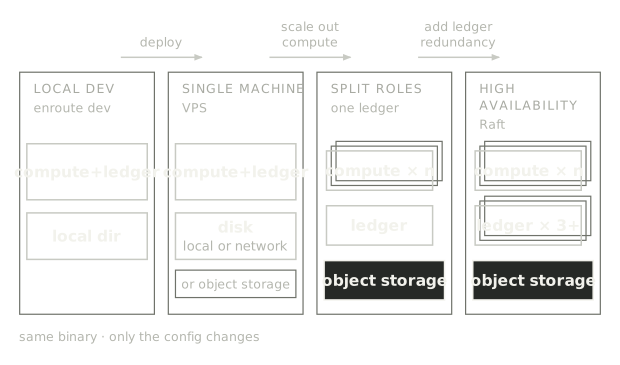
Let's have a closer look at what each setup looks like:
1. Dev setup: a full Git platform in one command
Since Enroute is fully programmable, this is where you start defining rules and automations for your repos before moving to production. When designing Enroute it was important for us that you can get started right away. You simply install Enroute (the quickstart has every step):
curl -fsSL https://enroute.sh/install | sh
Then you run the server with a single command:
enroute dev
That's it. You now have a running Git server with a gRPC API next to it. You can push your first repository to get started:
git push http://127.0.0.1:8080/hello.git main
Pushing and pulling is the trivial part. What makes enroute dev interesting is that it is a fully programmable Git server, and you can start building on it via the API and hooks.
Write to Git without the client
The gRPC API lets you create repositories, read files, history and diffs. You can also create commits directly on the server.
Try it from the CLI, which calls the same API your application would:
enroute commit hello --branch main -m "Add notes" \
  --author "You <you@example.com>" --put notes.md="hello"
If you clone the repository, the file has been created in a normal commit like any other. This is useful if you want to store your agent's artifacts in Git or if you want to use embedded version control in your product.
You can also read the same file back via the API. Use ListTree to find it and GetObject to stream it.
Using the building blocks you can turn documents, configs or agent output into commits without running the Git client.
Decide what happens on every request
What makes Enroute fully programmable is the integration via hooks. Enroute calls your application back through four signed HTTP hooks that you opt in to:
- Authorize: Decide who gets to read or write which repository.
- Visible refs: Return only the branches and tags you want a caller to see.
- Pre-receive: Decide which ref updates land. Apply branch protections or your own logic on who can push to which parts of your repository.
- Post-receive: Trigger automations after a push lands, like kicking off CI or a deploy.
All of this works on your local server. Point enroute dev at an endpoint in your app and pick the hooks you want:
enroute dev --hooks http://localhost:3000/api/enroute/hooks --enable pre_receive
Now, on every push, Enroute sends you each ref the push wants to change, and you answer allow or refuse:
async function judge(req: PreReceiveRequest, command: RefCommand) {
  if (command.refname !== "refs/heads/main") return allow;
  if (!command.newObjectId || command.force) {
    return refuse("main is protected: no force-push or delete");
  }
  return allow;
}
This is what the person pushing sees:
! [remote rejected] main -> main (main is protected: no force-push or delete)
This way, customizing Enroute to work exactly how you want it to work is straightforward: One rule in your own code, and you have branch protection. Add some more, and you can build your own merge queue or code forge.
To make this as easy as possible, we provide you with a guide that takes you from an empty Next.js app to a simple code forge.
It gets even easier if you use our agent skills: Run npx skills add enroute-sh/enroute and your agent knows how to start Enroute, connect to the API and hooks, and build protected branches, merge queues and CI checks on top.
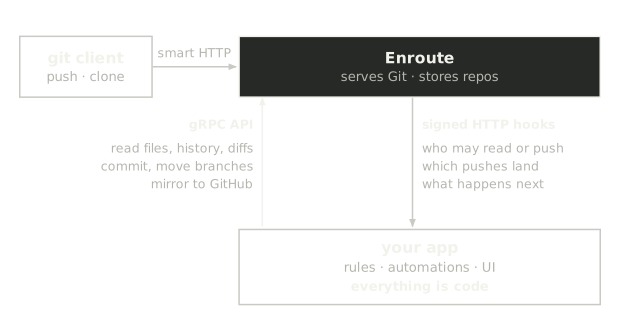
Under the hood, enroute dev is not just a development environment. It is a real single-node deployment with a local directory for storage.
2. A single VPS: no object storage required
For a side project, you often just want your own Git server to run on a small machine. You can still run the rules and automations you built locally against Enroute, without object storage or any other cloud dependency. Simply point the bucket at a directory on the machine's disk and run a single server with all roles:
[bucket]
uri = "file:///var/lib/enroute/objects"

[node]
data_dir = "/var/lib/enroute/data"
That disk can be the VPS's own local disk or network-attached, such as AWS EBS or the block volumes most hosting providers offer. A network disk outlives the machine: if the VPS dies, attach the volume to a new one and start Enroute with the same config. Once your VPS setup is up and running, you can continue with everything you built against enroute dev.
One thing to keep in mind: on a single VPS, the disk is where your repositories live, so back it up. Most hosting providers offer automatic backups or volume snapshots that you only need to switch on. On top of that, Enroute can push any repository to another Git host such as GitHub with a built-in API call, PushToRemote. Call it from your post-receive hook plus a periodic job, so everything gets mirrored off the machine.
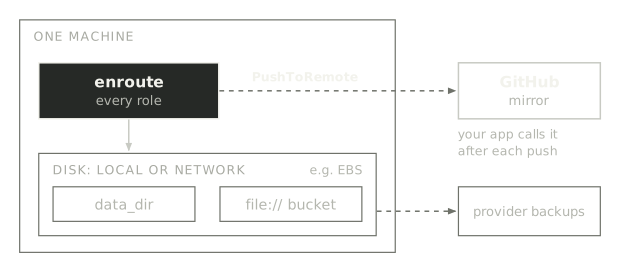
3. One ledger, many compute nodes: scale out the Git traffic
When more people, more CI or more agents hit your server, the work that grows is compute: receiving and checking pushes, building layers, serving clones and fetches.
Because Enroute separates compute from storage, you can scale compute nodes independently. Compute is stateless and can scale in and out.
The bucket sits on object storage, so every compute node can read the same data from it. One node becomes the ledger, and you spin up as many compute nodes as you need behind a load balancer:
[bucket]
uri = "s3://enroute-objects/prod"

[node]
role = "ledger"
data_dir = "/var/lib/enroute"
internal_listen = "0.0.0.0:7400"
advertise_url = "http://ledger-0.internal:7400"
[bucket]
uri = "s3://enroute-objects/prod"

[node]
role = "compute"
data_dir = "/var/lib/enroute"
Compute nodes find the ledger through the bucket, so there's no service discovery to set up.
- Compute scales with your traffic: Start another compute machine with the same config, or put compute in an autoscaling group. Compute is stateless, so it doesn't matter how many you run and the cache can be rebuilt from object storage.
- Storage that grows with your data: Git data lives in object storage, so it can grow without resizing a disk. Only the refs and the list of layers for every repository live on the ledger's disk. Every acknowledged push is already on that disk, so a ledger restart does not lose anything. Still, you need to protect the ledger's disk via backups.
If you can live with a single ledger node, this is a lot of capacity for very little operational surface. If you can't, there's step four.
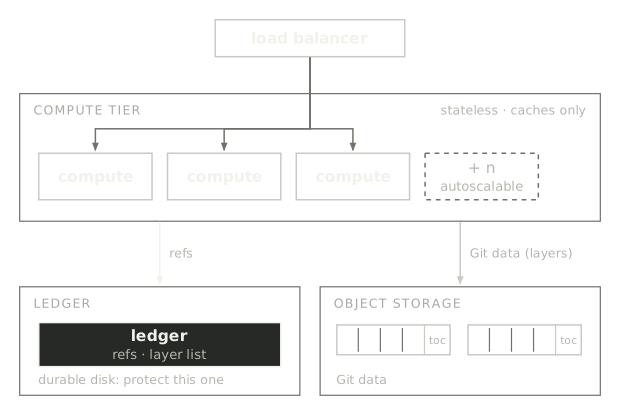
4. High availability: a three-node Raft cluster
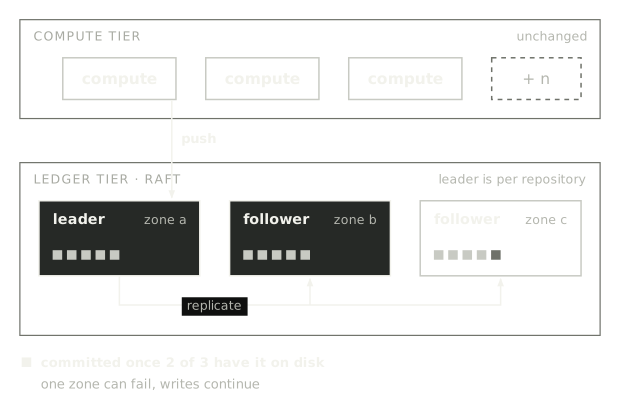
When you run a Git server at scale in production it must not go down. You can compensate for losing a ledger and even its disk by running three ledger nodes instead of one. Each repository gets its own Raft log and a leader is elected. A push is acknowledged only once it's on a majority of the nodes' disks. If a leader fails, a new one is elected that continues to take pushes.
The config is the ledger config from above, with a different advertise_url per node. A ledger node that restarts catches up on its own.
The compute nodes don't change. The same nodes keep serving Git behind the load balancer, and you keep adding them as traffic grows. That's the split in practice: the ledger nodes give you fault tolerance, and the compute nodes give you capacity.
Every ledger node holds every repository, so adding more ledger nodes doesn't add capacity. Give them fast disks with low sync latency instead, because that sync time is your commit time.
For a smaller footprint, three nodes that each run both roles work just fine.
Transition between setups
Once your repositories live in object storage, you can move a deployment from one setup to another without losing data and without pushing a single repository again:
- Scale out compute from a single server: Restart the server as the ledger, then add compute nodes behind a load balancer. Expect a short outage.
- Move to a high-availability setup: Start two new ledger nodes with the same bucket. The ledgers join every repository's log on their own.
There's no built-in way yet to move from a local directory to object storage, but you can mirror each repository to the new deployment with plain Git.
Try it
Start on your laptop, push something or make a commit through the API. When you're ready to host Enroute, the deployment profiles doc has the full config for every setup above.