Everyone is doing Git on S3 wrong
tl;dr: At Enroute, we have built a new kind of git server that is based on modern database principles, written in Rust and backed by object storage. In our testing, we’ve been able to achieve 7,600+ concurrent pushes per second on a single repository at millisecond latency; more than an order of magnitude faster than existing solutions, while delivering clone/fetch performance on par with exclusively disk-based architectures. We are making this available as open-source, programmable git infrastructure to unlock new possibilities for agentic coding at scale as well as bringing version control to more platforms and products.
While database technology has seen a massive wave of cloud-based innovation in the past few years, Git hosting hasn’t changed much. Up until now, the typical production Git hosting (probably the most famous of which being GitHub's Spokes architecture) has relied heavily on SSDs as the primary storage mechanism. This only makes sense, since both the Git client but also the Git data model virtually assume fast random access storage.
However, in a hosting context, this does not come without cost: Disks can fail, so one needs RAID and/or backups. Servers can fail, so every repository needs replicas to be highly available. And any disk eventually fills up, so repositories must be sharded and rebalanced across a fleet of file servers.
Object storage has become much better in the last few years, and so rewriting databases to run on object storage has been one of the hottest trends in infrastructure engineering lately, perhaps most famously turbopuffer who did it for vector search, as well as Neon for Postgres. The advantages are obvious: a bucket is durable, replicates itself and it never fills up.
Following this, it is only logical to want to put Git repositories into object storage too. Especially in this day and age, this matters particularly for agents: hundreds of clients pushing to a monorepo at once, or kicking off a large fleet of CI runs, is no longer a problem that is limited to just Google, Microsoft or Meta.
So it is not surprising to have seen more innovation coming for Git hosting solutions lately. Most prominently, in August, Cursor/SpaceX described Continuity, their S3-backed Git storage, in Git at any scale. What followed were many open source implementations copying the same approach of an S3-backed write-ahead log (WAL) for Git.
While these implementations have been successful in moving the burden of scalability and durability into object storage, they fall short in two ways: Firstly, while they perform well when scaling out reads, they typically falter under write-heavy traffic. And secondly, they still rely on the canonical Git CLI which memory maps files on disk, which means that they need to have each repository fully loaded on disk before they can begin serving it.
Git is not just a content-addressable storage system
To understand why Git is hard to put on object storage, we first need to look at how Git actually stores data. There are three kinds of objects:
- Blobs hold the contents of a file
- Trees describe a directory and point to blobs and other trees
- Commits point to a root tree and their parent commits
Each object is addressed by the hash of its content, so it never changes. On top of that there are refs. A ref is just a name that points to an object. Branches are refs: main is stored as refs/heads/main and holds the hash of the latest commit on that branch. When you commit or push to a branch, Git writes the new objects first and then moves the ref to the new commit. Refs are the only thing in Git that changes, everything else is immutable.
So in a sense, Git is a content-addressed storage with mutable pointers layered on top. However, Git is not just a content-addressed storage system. It is also a graph database: Any object can point at, or be delta encoded against, any other object.
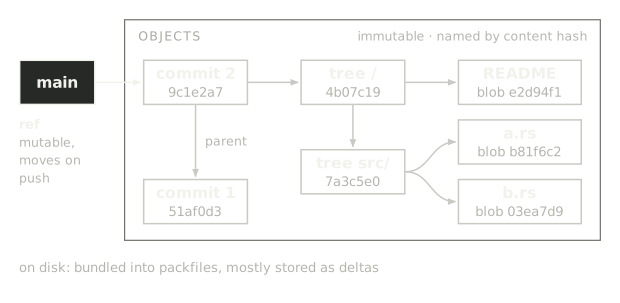
If Git wants to answer a query, it typically starts at a ref and follows the pointers from commit to tree to blobs, and it only knows the next key to fetch once the previous read has come back. On top of this, an object may be delta encoded, and so it may also need to follow its delta chain to the base object. On a local disk this is basically free.
If one were to treat Git as just content-addressed storage on object storage, every one of these steps would be a 30-40ms round trip.
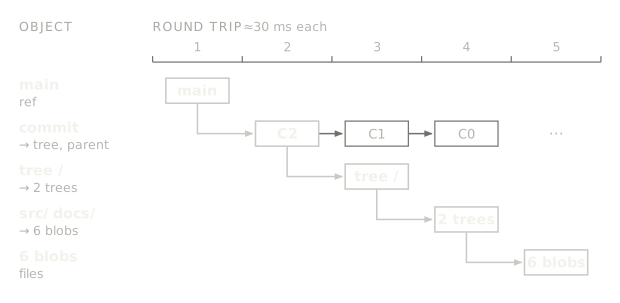
This is why treating Git on object storage as just a content-addressed storage problem doesn’t work. Instead, the key to Git on object storage is maintaining data locality: Keeping the set of objects that are frequently used together close so they can be covered with a small number of reads.
Incidentally, this is exactly what the Git CLI does when your repository on disk gets large enough: It bundles objects into a packfile, writing a single monolithic file that it can map into memory for fast access. So you might be wondering: Why not just put those packfiles on S3?
Using a write-ahead log (WAL)
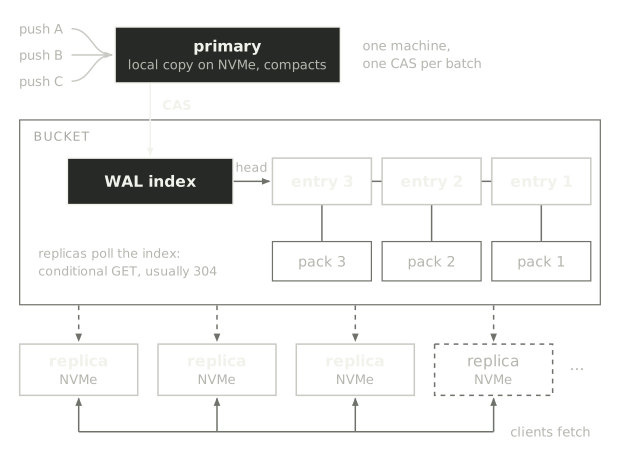
Recently made famous by Cursor Origin, this newer design keeps Git's packfiles and makes the bucket a log. Each push is stored as an immutable packfile plus a log entry. Packfiles become visible through conditional PUTs against a WAL index, which records a pointer to the new entry, once the push's ref transaction is prepared on a local copy. Once committed this way, any machine can serve any repository by rebuilding a local copy from the log.
This design gets a lot right:
- Reads are fast. Serving Git requests happens from fast disks, packs keep their deltas, and a server checks for updates with just one conditional GET of the WAL index file.
- No moving parts. The bucket is the only durable state. Every server is fully ephemeral and is easy to scale in and out.
- Full provenance. Every push and every repack is in the log and can be replayed.
On the read path, the log is a real win. Any server can rebuild a local copy from the bucket and serve fetches from it, so reads scale out with replicas: Cursor reports linear read scaling up to 100 of them. Durability and failover, the hardest parts of running Git on disks, come with the bucket.
The write path however still depends on a single linearizable sequence of packfiles. This brings two problems: In effect, write operations to one repository compete for the same WAL index object and are then applied by one machine in sequence.
To their credit, Cursor have worked hard to make WAL updates fast:
- Batching: One S3 write publishes several pushes, because "one single S3 write per push [...] puts a hard cap on push throughput based on the latency of the S3 PUT operation."
- Leader election: Any server may accept a push, but one chosen by rendezvous hashing always does, because the others would lose compare-and-swaps and retry. That primary keeps the repository on local NVMe and compacts it there.
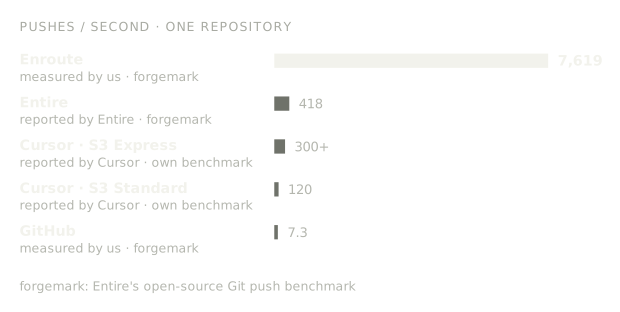
With these improvements, Cursor reports up to 120 pushes/s on S3 Standard and more than 300 on S3 Express One Zone, where they find it is "effectively bottlenecked by the speed at which Git can compact the on-disk data."
At the end of the day, no matter how fast the WAL is, every push still has to land in one repository on disk. This means that Git’s single repository write throughput remains the shared limit for all pushes and repacking/garbage work on a repository. However many servers you run, a repository can only ingest as fast as one machine can apply and compact.
The Continuity design has significantly raised the ceiling for git hosting. However, it stops short of making Git fully scalable: Not only is this effectively a single-writer system, but while the bucket stores the log and the data, reads aren't served from it. Instead, every replica still has to keep a full copy of the repository on disk, no matter how large and how long it takes to download, to serve it.
What would Git look like if it was designed as a modern database?
While building Enroute, we’ve been asking ourselves the question: What if Git worked more like a modern distributed system backed by object storage, rather than a file on a disk? The answers we came up with rely heavily on proven distributed systems principles that we adapted to Git.
The results speak for itself: Running in the cloud on EC2 and S3, we have achieved a sustained peak load of more than 7,600 concurrent pushes per second on a single repository!
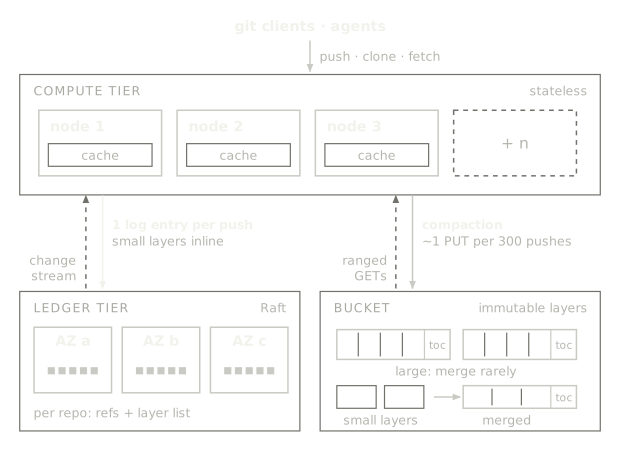
Like many modern databases, Enroute separates compute and storage. Our storage tier consists of replicated log for low-latency operations and an object storage backend for scalability and long-term durability. Compute is fully stateless and holds nothing but cache. In contrast with the WAL-on-S3 design, we made three key design decisions that result in higher throughput and lower latency:
- Fast, durable reads and writes with distributed consensus: Object storage is great for data at rest, but a conditional GET or PUT takes tens of milliseconds. We solve this by running a highly performant, replicated log per repository with CockroachDB-style MultiRaft consensus that is responsible for handling ref updates as well as maintaining the list of layers that make up a repository's data.
- Optimistic locking and multi-version concurrency control: Most of a push’s work happens before it is committed: indexing the pack, validating every object and re-encoding it for storage. Compute nodes are capable of running this work in parallel without having to take any locks. Only commits are applied in order through a compare-and-swap on the refs the push moves. Pushes to different branches never conflict and readers work on immutable snapshots, so they never starve writers.
- Storage format optimized for object storage: As we saw, every design that moves the Git graph to remote storage unchanged pays for it either with costly roundtrips or has to keep a full copy on disk. For Enroute, we are rewriting packfiles during ingestion to place a set of constraints on the object graph’s connectivity. This way, reads can stay fast even if the objects they are looking for need to be loaded from object storage.
Pushing the limits of what a repo can absorb
Enroute is optimized for scale. Following the principle of separating compute and storage, we replaced the traditional git server with two dedicated tiers:
1. Ledger tier: A small cluster of nodes that keeps one replicated log per repository using Raft consensus. The log holds the repository's refs and the list of layers that make up its data. A layer is an immutable file of Git objects with its own index, much like a Git pack.
2. Compute tier: Any number of interchangeable nodes that do the actual Git work: building layers, serving clones and fetches and compacting. Compute nodes keep nothing that can't be rebuilt from the ledger and the bucket.
Let’s step through how this helps repo-level scalability by following a single push request:
- Compute node receives a push: The client sends the pack over HTTP to any compute node. The compute node writes it to the local disk for processing.
- Compute node builds a layer: It validates the received pack and bundles the new objects into a layer. This step happens without any coordination and so can handle many concurrent pushes.
- Compute node commits changes to the ledger: The log’s leader receives the request to update refs and the layer is persisted. Here, the write may be rejected, which leaves a layer in object storage that will later be reaped.
- Ledger replicates the entry: Once a majority of ledger nodes have acknowledged the push, the compute node’s request is acknowledged and then broadcast to all other compute nodes.
- Compute node reports success: As soon as the ledger confirms the commit, the node reports success to the client. Updating its in-memory view happens in the background.
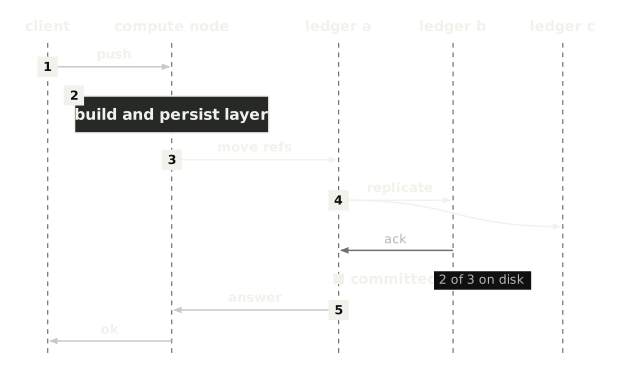
You might wonder where the bucket comes into play? In practice, most pushes tend to be small, so there is a fast path that allows them to initially travel inlined into the log, deferring object storage writes until the log is flushed. Only layers larger than 1 MiB are uploaded directly to the bucket and then committed as a ledger entry.
Why one busy repository stays fast
Compared to the WAL approach, the log is no longer written in the bucket, but it is not the only thing that helps us keep throughput on a single repository fast:
- Slow work happens before and after the log. Building the layer and the local indexes is the expensive part of a push. In Enroute, this runs concurrently on the compute nodes. Only the part that actually needs coordination pays for it.
- Appending is cheap. Committing a log entry typically requires 1-2 milliseconds of network and disk latency, not a bucket round trip. With group commits, one fsync covers every push that arrives in the same moment, across all repositories.
Batching and compaction
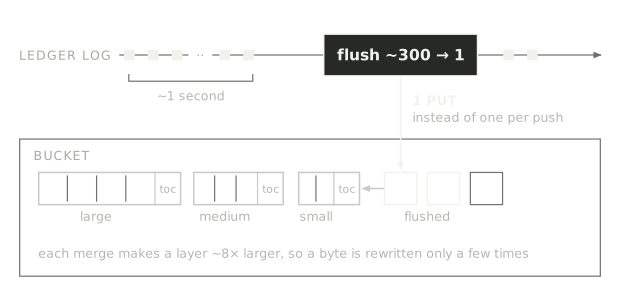
We want data to eventually end up in object storage and keep the ledger lightweight, so inline layers can't stay in the log forever. Only refs and the layer list remain on the ledger nodes in the long run.
However, uploading layers one by one would bring back the object storage request cost we just avoided, so layers move in batches to the bucket. About once a second, a compute node flushes the layers from the log: It takes the recent inline layers, merges them into a single file, uploads it to object storage, and swaps out the layers in the log. If you’re familiar with LSM trees, this is similar to a memtable flush.
The same compute node also runs compaction jobs by merging small layers into bigger ones. Merges only copy bytes without recompressing them, so they are relatively inexpensive to run. Once about eight layers of similar size pile up, they are merged into one layer roughly eight times larger. This way, a byte is rewritten only a handful of times as the repository grows, and the largest layers are merged rarely.
Stateless compute and a cache that removes the read penalty
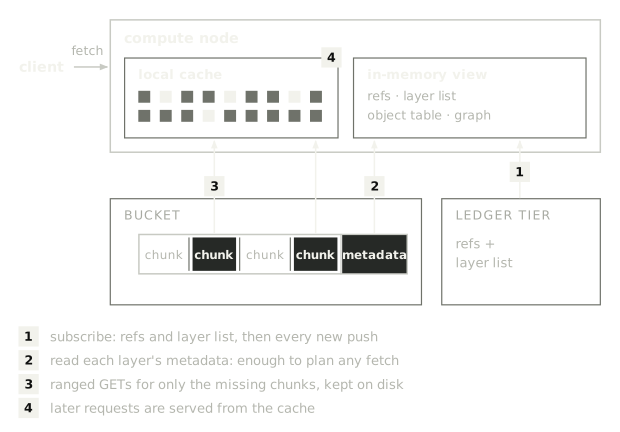
To keep typical read accesses to a repository fast, Enroute caches parts of layers locally in memory and on disk via a buffer pool abstraction which pages data from object storage as needed.
In turn, compute nodes hold no state. On the first request for a repository, it downloads only what’s required to serve the request from the ledger and object storage, typically the repository and layer metadata as well as the first few chunks of the most recent layers. To keep its data up to date, the compute node subscribes to log updates for the repository and gets updates on refs and the layer list.
When a request needs more data that isn't on disk, the node fetches just the chunks it needs, with parallel ranged GETs. But even a cold cache costs less than you might think. In our tests, a node with an empty disk served a full clone of linux.git in 128.6 seconds, against 126.2s seconds warm.
Don’t walk the tree!
The secret to serving repositories from object storage lies in optimizing for access patterns: It turns out that with only a few exceptions, a Git client never asks a server for random objects. Instead, a clone or a fetch negotiates what it needs based on the commit history: The set of commits the client wants to fetch, and what it already has locally.
The server's job is to send everything reachable from the requested commit without sending data already available. In practice, these are the objects from a consecutive run of commits. Canonical Git uses the object graph at read time to answer these questions and that assumes the full repo is on a local disk. We already learned that this does not work on object storage, but there is another way!
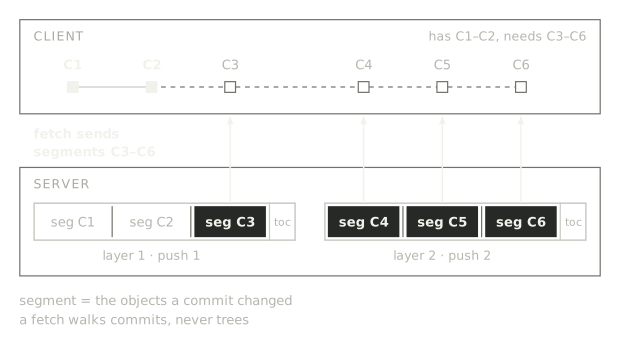
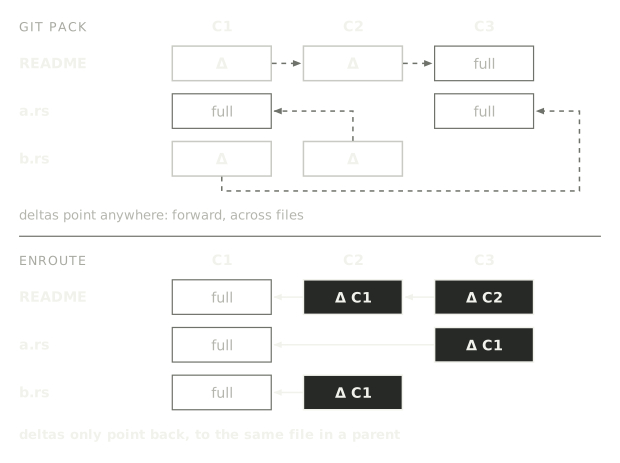
To fix this we developed a new storage format. Every commit is recorded in a segment. Each segment holds the set of objects representing the delta to the commit’s parents. Multiple consecutive segments are grouped into layers, which are immutable files with a table of contents at the end. The segment of a commit in combination with its ancestors holds all necessary data that is reachable from a commit. So to catch the Git client up on recent changes, Enroute can simply serve it from the respective segments, knowing that the common ancestry between client and server contains all dependencies to properly resolve the packfile.
This works because Enroute restricts Git’s object graph in two ways:
- Cut the graph along commit boundaries: When a pack is pushed, Enroute compares each new commit’s tree with its parents and bundles the trees and blobs that changed in the commit's segment.
- Keep every delta inside the ancestry: Enroute rebuilds object deltas in the segment by picking from possible delta bases constrained to the segment’s ancestors. This allows serving thin packs to clients without rebuilding deltas on the fly.
Of course, as with all things in engineering, there are trade-offs. While for us, this format has shown massive benefits not just for speed but also simplicity, it also comes with some caveats:
- Duplicates: The same object can appear in several commits' segments, but a valid packfile may contain each object only once. Enroute deduplicates while building the object list, and then skips those duplicates during segment streaming.
- Shallow fetches: A shallow clone has none of the parent commits, so objects stored as deltas at its boundaries have to be sent in full. Enroute rebuilds them in bulk and caches the results, so repeated shallow clones with the same boundary can be fast.
- Partial clones: A clone with --filter=blob:none skips file contents and fetches single files later. Layers cluster objects of the same kind closer together, to make it cheap to apply this type of filter. Individual object fetches then coalesce multiple point reads into larger chunks.
Benchmarks - How many pushes can a single repo take?
To put Enroute’s design to the test and push its limits, we used forgemark, which is capable of simulating large numbers of concurrent agents pushing to branches of one shared repository. In these tests, Enroute demonstrates a peak performance of more than 7,600 pushes per second into a single repository.
Put into perspective, this is roughly 18 times what Entire.io reports and more than 1,000 times what GitHub is currently able to handle (the numbers come from slightly different setups but give a good sense on the order of magnitude).
We’re not saying everyone needs a repository that supports 7,600 pushes per second today, but we are excited about what becomes possible when pushing to a Git repository is no longer a bottleneck:
- Push every commit: When a push takes milliseconds instead of seconds, there is no reason to batch. Agents can push every step they take, so no work is lost and every intermediate state is visible and reviewable in real time.
- Git inside your product. Products that store data which can benefit from version control, like documents, configurations or designs, can turn user action into Git commits without having to queue and batch.
- Thousands of agents in one repository. Instead of giving each agent its own fork or repository to avoid contention, thousands of agents can coordinate and work in the same repository.
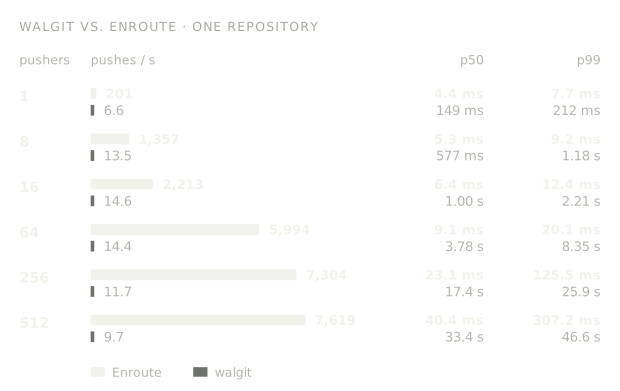
To get a better sense of performance under load, we also compared Enroute with the most famous open-source Git server on object storage, walgit. Using the same benchmark, we gradually scaled from 1 to 512 concurrent pushes, while keeping a close eye on latency:
However, pushes are only half the story. A forge spends most of its time serving clones and fetches, and that is exactly where git hosting on object storage needs to close the gap against purely disk-based architectures. We compared Enroute with a warm cache against stock Git 2.56.0, served by git http-backend behind Apache, using a repacked copy of linux.git, and measured the wall time as the client sees it, from starting the command until it returns.
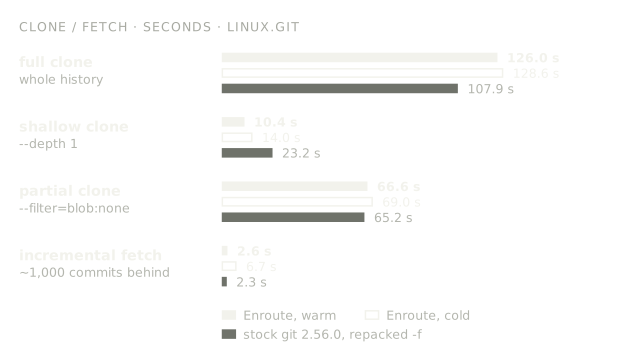
The results are close, and in one case clearly better: Enroute managed to shine on the shallow benchmark, with its clones being more than 2x faster. This showcases not just the value of caching in Enroute, but also its raw server performance.
Partial clones are on par, full clones are about 17% slower and incremental fetches about 11% slower. Interestingly, this difference mostly happens on the client side: While Enroute’s server is faster than stock git, the deltas it serves are currently more computationally expensive for the client to decode.
We're not done yet
What we built shows that you can scale Git hosting based on modern database principles on top of object storage. But it is only the start, and there is still a lot we want to improve and find out:
- Smarter delta base: Interestingly, the biggest performance gap is now on the client side. Enroute is often faster than canonical Git at serving a fetch, but the Git client then spends more time validating the pack and decoding deltas than the server spent sending it. We want the best of both worlds, and pick bases that are both fast to serve and fast to decode.
- Write API: Currently Enroute supports git push to write objects. We also want to offer gRPC endpoints that perform Git operations like commits and merges serverside, built for agents and embedded products.
- Garbage collection: Layers are immutable, so a deleted branch or a force-push leaves unreachable objects behind. We need a way to find them and rewrite layers without blocking reads or pushes.
- Protocol completeness: Enroute currently speaks Git over HTTP smart protocol. SSH and a few less common parts of the protocol are still missing.
- Smart routing: Enroute currently doesn't coordinate which compute node serves which repository, so with many repositories the same data ends up cached on many nodes. We want to add a routing layer that gives each repository a home node, so every node can keep a larger share of repositories warm.
- Cold start performance: The fetch performance of a cold compute node lies far below what is possible once the node is warmed up and the cache is hot. We already have some ideas on how to close that gap.
- Configurable caching: Right now every node caches data the same way. We want to make it configurable what gets cached and for how long, so that a node serving CI can behave differently from one serving developers.
- Compute autoscaling: Since compute nodes hold no state, adding one is cheap. We want to use this to scale nodes up and down automatically with load, and to measure how quickly a new node gets fast on large repositories.